Offline PDF Editor

The full PDF editor that never touches the cloud.

Edit text and images, redact, sign, fill forms, run OCR, convert and merge PDFs — entirely on your own device. Nothing is uploaded, ever.

No download, no install — runs right in your browser. Or get the desktop app for offline use.
Available on
Web macOS Windows Linux
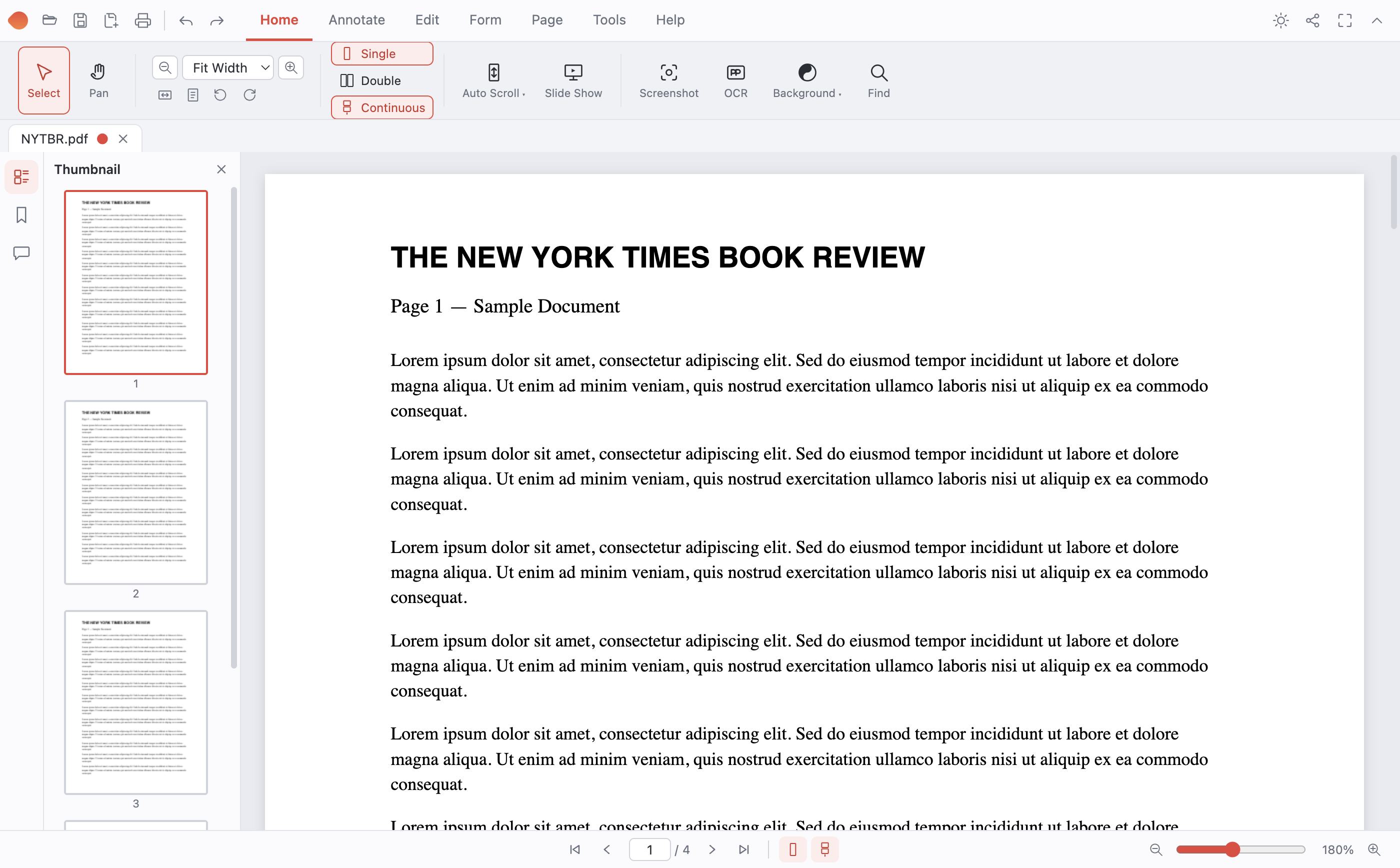
pdf.publishingmonkey.com/app
Author Services PDF editing a document

Most PDF tools work against you.
This one works the other way around.

Every edit, signature, and redaction happens on your device — so your contracts, tax forms, and medical records never leave your hands.

No cloud

100% local processing

No account

Zero signup required

No limit

Free forever · all features

Your files. Your machine.
Nobody else’s business.

01

Your documents stay yours

Nothing is uploaded, cached on a server, or scanned for advertising. What you open on your computer stays on your computer.

02

No account, no subscription

Download it and use it. There’s no signup wall, no monthly fee, and no feature locked behind “Pro.”

03

Works anywhere, anytime

On a plane, in a secure facility, or on a spotty connection — Author Services PDF doesn’t need the internet to do a single thing.

Verified offline · AES-256 encryption · No telemetry
Feature Index

Everything a PDF editor should do

One app for the whole job — no upsells, no “that feature costs extra.”

01 Edit & Annotate
6 features
+×
01

Edit Content

Change the text and images already in a PDF. Retype a line, adjust fonts, add new text anywhere, insert pictures, or white out what you don’t need.

02

Annotations

Highlight, underline, and strike through text, and drop sticky-note comments anywhere on the page.

03

Draw & Markup

Freehand pen plus rectangles, ellipses, lines, and arrows for marking up contracts and diagrams.

04

Find & Replace

Search across the whole document and swap text out, with the option to permanently remove the original words.

05

Watermarks

Stamp text or an image across your pages, with control over opacity, angle, tiling, and which pages get it.

06

Metadata Editor

View and change a document’s title, author, subject, and keywords.

02 Security & Privacy
3 features
+×
01

True Redaction

Black out sensitive information for good — the content is permanently removed, not just hidden under a box.

02

Auto-Redact

Scan for Social Security numbers, emails, phone numbers, and card numbers, then remove them all in one pass.

03

Password Protection

Open encrypted PDFs, add AES-256 encryption to protect a file, or remove a password you already know.

03 Forms & Signatures
3 features
+×
01

Fill Forms

Complete any fillable PDF with live fields and tab navigation, then save your answers into the file.

02

Build Forms

Add your own text fields, checkboxes, dropdowns, and radio buttons to turn a flat page into an interactive form.

03

Sign Documents

Draw, type, or import your signature, save it for reuse, and place it anywhere. No printing or scanning.

04 Organize & Convert
4 features
+×
01

Compress

Shrink oversized PDFs, with a lossless mode for everyday files and a stronger mode for heavy scans.

02

Split & Merge

Combine any number of PDFs, or split one by page, by range, into chunks, or down the middle of a page.

03

Organize Pages

Reorder, rotate, delete, extract, and insert pages by dragging thumbnails around.

04

Convert

Turn pages into PNG or JPEG images, build a PDF from photos, or export text to Word (.docx).

05 OCR, Scan & View
5 features
+×
01

OCR (Offline)

Make scanned documents searchable, or extract their text — in English, Spanish, French, or German, all on-device.

02

Scan Documents

Capture paper with your camera. Edges are found, the angle corrected, and the image cleaned up automatically.

03

Tabbed Viewer

Open several PDFs at once, with single, double-page, or continuous scrolling, plus night and eye-comfort modes.

04

Bookmarks & Links

Add clickable links and a real bookmark outline to make long documents easy to move through.

05

Print

Send any document straight to your printer through the standard dialog.

21 total features · Free forever
Two ways to use it

Use it now, or take it with you.

Easiest · Nothing to install

Use it right in your browser

No download, no .dmg or .exe to install. Works on any device with a browser — Windows, Mac, Linux, even a Chromebook. Your files still never leave your device.

Open in Your Browser
or download the desktop app for offline use
Choose the version for your device below

macOS

Apple M1 / M2 / M3 / M4
Download for Apple Silicon →

macOS

Intel-based Macs
Download for Intel Mac →

Windows

Windows 10 & 11 · 64-bit
Download for Windows →

Linux

64-bit · portable
Download for Linux →
Prefer not to install? Use it in your browser — nothing to download.
Installing on Windows — about the SmartScreen notice

Windows may show a blue “Windows protected your PC” window. That’s expected for new, independent software — it means the file is unfamiliar to Microsoft, not that anything harmful was found. Click More info, then Run anyway. You can also use the browser version, which installs nothing.

Good to Know

Questions

Is it really free?

Yes. Every feature is free for personal and commercial use. There’s no trial, no paywall, and no “Pro” upgrade.

Do I need an account?

No account to create — just the shared access password (ask your team). That unlocks the app and downloads; everything then runs on your own device.

Do my files get uploaded anywhere?

Never. Signing in only unlocks access — it doesn’t change how the editor works. All editing happens on your own device, in the app or your browser tab, with nothing uploaded.

What’s the difference between the browser version and the download?

They’re the same editor. The browser version needs nothing installed and works on any operating system. The download works offline forever, handles very large files more comfortably, and integrates with your file manager.

Which platforms are supported?

The browser version runs anywhere with a modern browser. Desktop downloads are available for Windows 10/11, macOS (Apple Silicon and Intel), and 64-bit Linux.

Windows says “Windows protected your PC” — is something wrong?

No. SmartScreen shows that notice for installers it doesn’t yet recognize, and this is a new, independent app. Click More info, then Run anyway — or just use the browser version, which installs nothing. You can also verify the file on VirusTotal or install with your internet disconnected, since the app works entirely offline.

Will I get a warning on a Mac?

No. The Mac download is signed with our Apple Developer ID and notarized by Apple, so it installs and opens with no warnings.

Your documents. Your device.

Open a PDF and start editing — in your browser or on your desktop. Free, private, and yours.

Download Free
Free · No credit card · Nothing uploaded